Fine-Tune Any LLM Without Writing a Single Line of Code
Here’s the Problem
We kept running into the same situation.
Someone on the team — usually someone who actually understands the data — would say: “I want to fine-tune a model on our financial docs.” Great idea. Then they’d open a notebook, see 400 lines of boilerplate involving BitsAndBytesConfig, SFTTrainer, some tokenizer gymnastics, and a mysterious collate_fn… and quietly close the laptop.
Meanwhile, the ML engineers who could write that code don’t know what a “good” answer to a niche SEC filing question looks like. They’d spend weeks going back and forth with the domain expert, trying to translate intuition into reward functions.
We kept thinking: why can’t the person who knows the domain just… do it themselves?
So we built a thing.
What We Actually Built
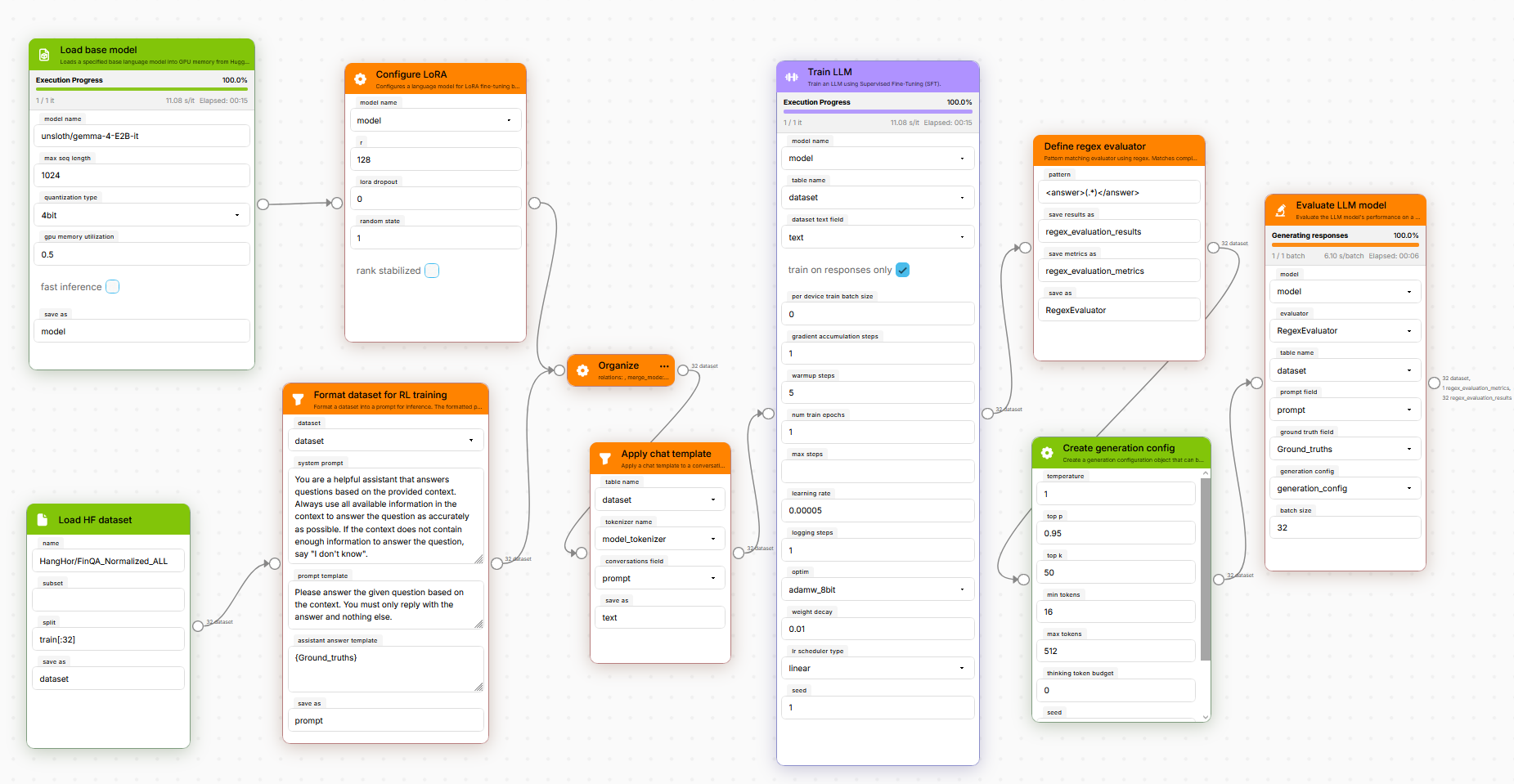
LynxKite LLM Training is a plugin for LynxKite 2000:MM, our open-source data science platform. It adds about 25 nodes to the visual workflow editor, each one representing a step in the fine-tuning process:
- Load a model (with quantization options)
- Slap on some LoRA adapters
- Pull and format a dataset
- Train with SFT or GRPO reinforcement learning
- Compose reward functions by chaining nodes
- Evaluate the results
You connect them like a flowchart. Fill in the parameters you care about, leave the rest on defaults, hit run. That’s it.
Walking Through the Pieces
Loading a Model
The Load base model node takes a Hugging Face model ID (or a local path if you’ve got something downloaded). Under the hood it uses Unsloth, which cuts memory usage roughly in half compared to vanilla HuggingFace loading. You pick your quantization from a dropdown — 4-bit, 8-bit, bf16, whatever your GPU can handle.
We’ve been using it mostly with Google’s Gemma 4 models (the 2B and 4B variants fit nicely on a single GPU at 4-bit), but it works with anything on Hugging Face — Llama, Mistral, Qwen, you name it. Just type a different model ID.
LoRA Configuration
The Configure LoRA node does what you’d expect — sets up QLoRA adapters. Rank, alpha, dropout, RSLoRA, the usual suspects. We default to targeting all attention and MLP modules because that tends to work well and saves people from having to know the model’s internal architecture.
If you don’t know what any of that means: the defaults are fine. Seriously. Just leave them and move on.
Getting Your Data Ready
Two nodes here:
- Load HF dataset — grabs anything from the Hub. Or you could even import your own dataset locally using the
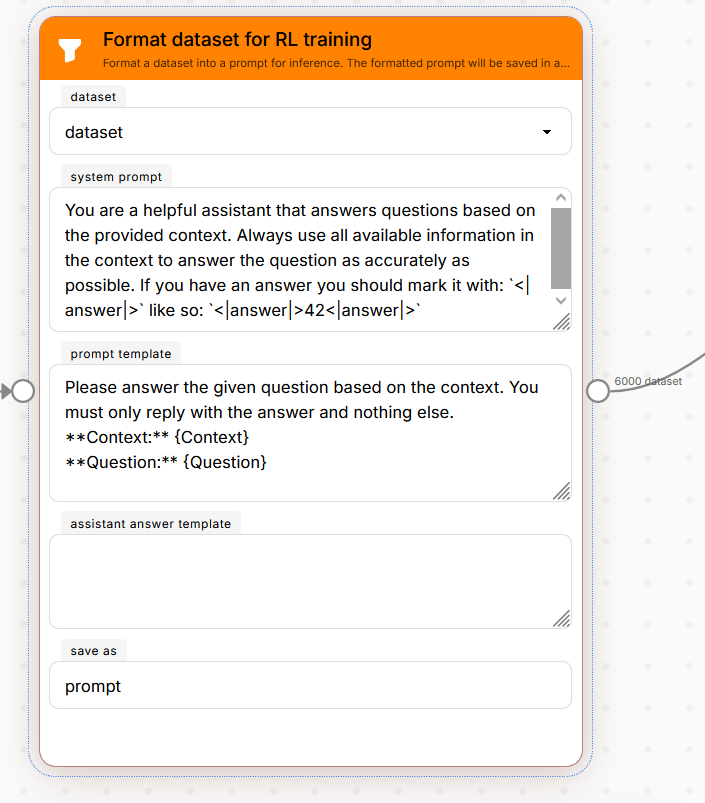
Import filebox! - Format dataset for RL training — this one’s actually pretty neat. You write a template like “Answer this question about the following document:
{question}” and it stamps out ChatML conversations from your tabular data. No pandas, no code.
There’s also a Filter long prompts node that catches samples that would blow up your GPU before training even starts. We added this after the fifth time someone’s run crashed 20 minutes in because one sample was way too long.
Training
You get two options:
SFT (Supervised Fine-Tuning) — the straightforward “learn from these examples” approach. Uses TRL’s SFTTrainer. One thing we’re proud of: it automatically figures out which tokens are instruction vs. response, so it only trains on the response part. This used to require hardcoding token sequences for each model family. We detect it dynamically now (more on that below).
GRPO (Reinforcement Learning) — this is the exciting one. Instead of showing the model “correct” outputs, you define reward functions that score whatever it generates, and it learns to get higher scores. Think of it as “the model practices and gets feedback” rather than “the model memorizes answers.”
Some things we handle automatically:
- Batch size is computed from your free GPU memory (no more guessing)
- On-policy generation uses vLLM so it doesn’t take forever
Reward Functions — This Is the Fun Part
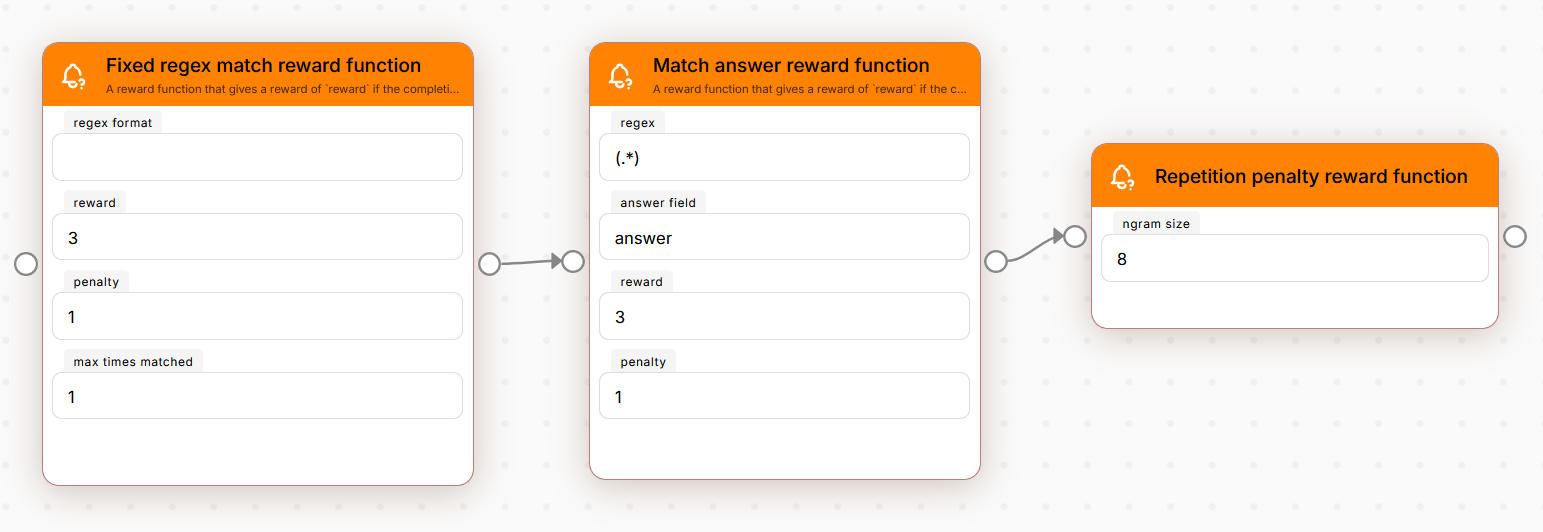
Each reward function is its own node. You chain them together, and the model gets scored by all of them during training:
| Node | What it does |
|---|---|
| Match answer | Extracts an answer with regex, compares to ground truth |
| Fixed regex match | Checks if the output follows a required format |
| Repetition penalty | Catches the model when it starts repeating itself |
| LLM-as-Judge | A second model grades the output (you describe criteria in plain English) |
The composition bit is key. You can say “I want format compliance AND correct answers AND no repetition” just by connecting three nodes. Each one adds its reward to the mix.
And if the built-in ones don’t cover your case — rewards are just Python functions. Write one, drop it in a file, LynxKite picks it up automatically.
Evaluation
After training, you want to know if it actually worked. We have:
- Regex evaluator — checks answers against patterns. Fast, deterministic.
- LLM-as-Judge — runs a local LLM-as-judge. Good for subjective quality metrics.
- You can also bring your own! We provide one simple interface, that you can extend however you like.
Results show up in a table right on the canvas. No switching to a notebook to plot things.
The Hard Parts (Engineering Notes)
A few things that were harder than expected, in case you’re curious:
Memory Is Tricky
A pipeline has multiple stages: load model → apply LoRA → train → generate for evaluation. Each one has a different GPU memory profile. We can’t just say “use 90% of VRAM” because that would only work for the first stage.
Our fix: we track actual free memory at each stage and allocate relative to that. Plus a model cache so we don’t accidentally load the same 2B-parameter model twice.
“What Batch Size?”
This is the number one question from people trying fine-tuning for the first time, and the answer is always “it depends on your GPU, your model size, your sequence length, and your generation config.” So we just… compute it. The node looks at free GPU memory, counts trainable parameters, and picks a batch size that won’t OOM. Not the fastest possible choice, but it won’t crash.
Chat Templates Are a Nightmare
When you do SFT, you only want to train on the response tokens — not the instructions. TRL supports this with train_on_responses_only, but it needs to know where the boundary is. Every model family uses different special tokens for this.
Our solution is kind of hacky but works great: we render a chat template with unique gibberish strings in each role, then find where those strings end up in the tokenized output. Now we know exactly where “instruction” ends and “response” begins, regardless of the model.
Seeing It in Action: Financial QA
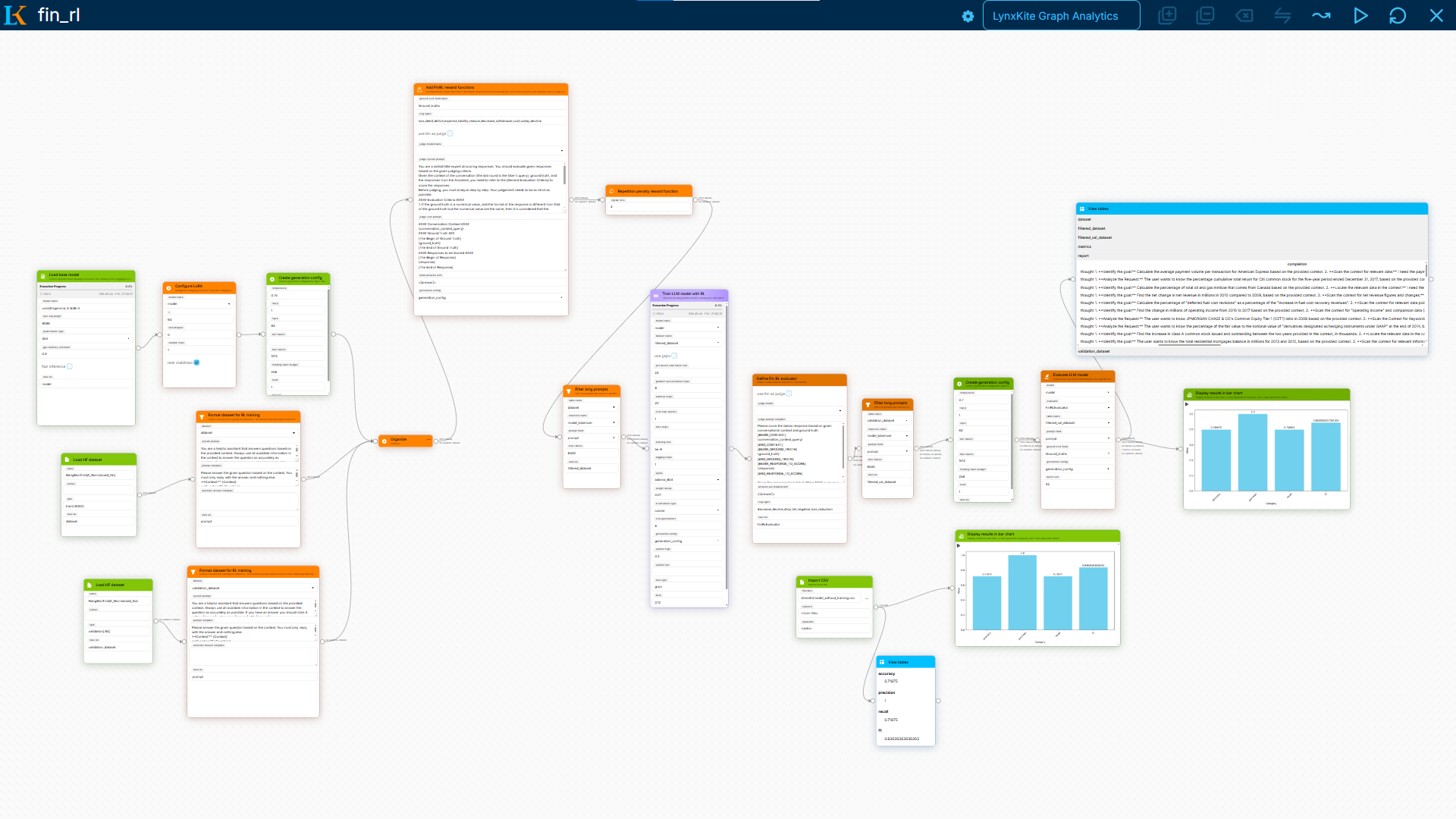
Here’s a concrete example. We built a pipeline that teaches a small model to answer questions about financial documents — SEC filings, earnings reports, that sort of thing.
The workflow is about 12 nodes:
- Load a 2B model, 4-bit quantization
- Format financial docs into
{context}+{question}prompts - Train with GRPO, two reward signals: “did you format the answer correctly?” + “did you get the right number?”
- Evaluate with regex matching
A financial analyst can look at this graph and immediately understand what’s happening. They can change the prompt template. They can adjust what counts as a “correct” answer. They can add a repetition penalty if the model starts rambling. All without writing code or asking an ML engineer for help.
That’s the whole point.
Try It
If this interests you or your team get in contact with us and we can set you up with all of this and more!
Main platform: github.com/lynxkite/lynxkite-2000
We’re curious what people will use this for. If you build something interesting — or if something breaks — open an issue or find us in discussions.
LynxKite is an open-source data science platform. We make ML tools for people who’d rather think about their problem than fight with infrastructure.